
Create an epic
Give it the document a client actually sent you. What comes back is a build order across every repository the work touches, with every task sized, every open question listed, and an architecture drawing for each phase, before anyone writes a line.
Watch instead: The StellarView Unboxing. One minute.
New here? Galaxy, Big Bang and Epic each have a short film in the glossary.
What it looks like
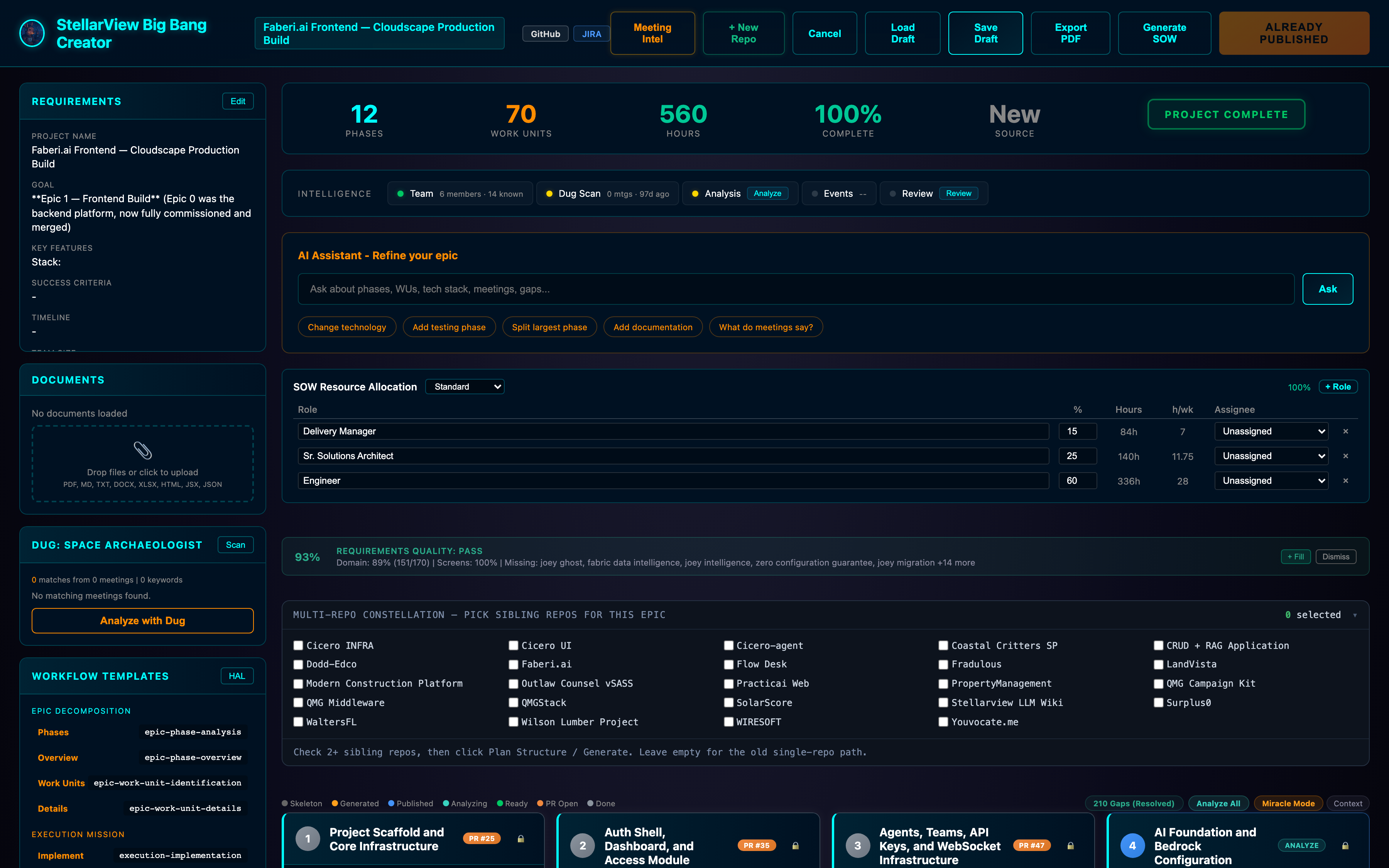
This is a real plan for a real product: the Faberi.ai frontend build, twelve phases of it, already shipped.
Five numbers run across the top, and they are the whole summary:
| 12 phases | each one independently scoped and executable |
| 70 work units | each sized, each with acceptance criteria |
| 560 hours | totalled from the units, not estimated at the top |
| 210 gaps | every question the plan could not answer, all resolved |
| 100% complete | and the badge in the corner reads already published |
The hours are the part worth pausing on. Nobody guessed five hundred and sixty. Seventy units were each sized, and the number is their sum. When a unit changes, the total changes with it.
The work units
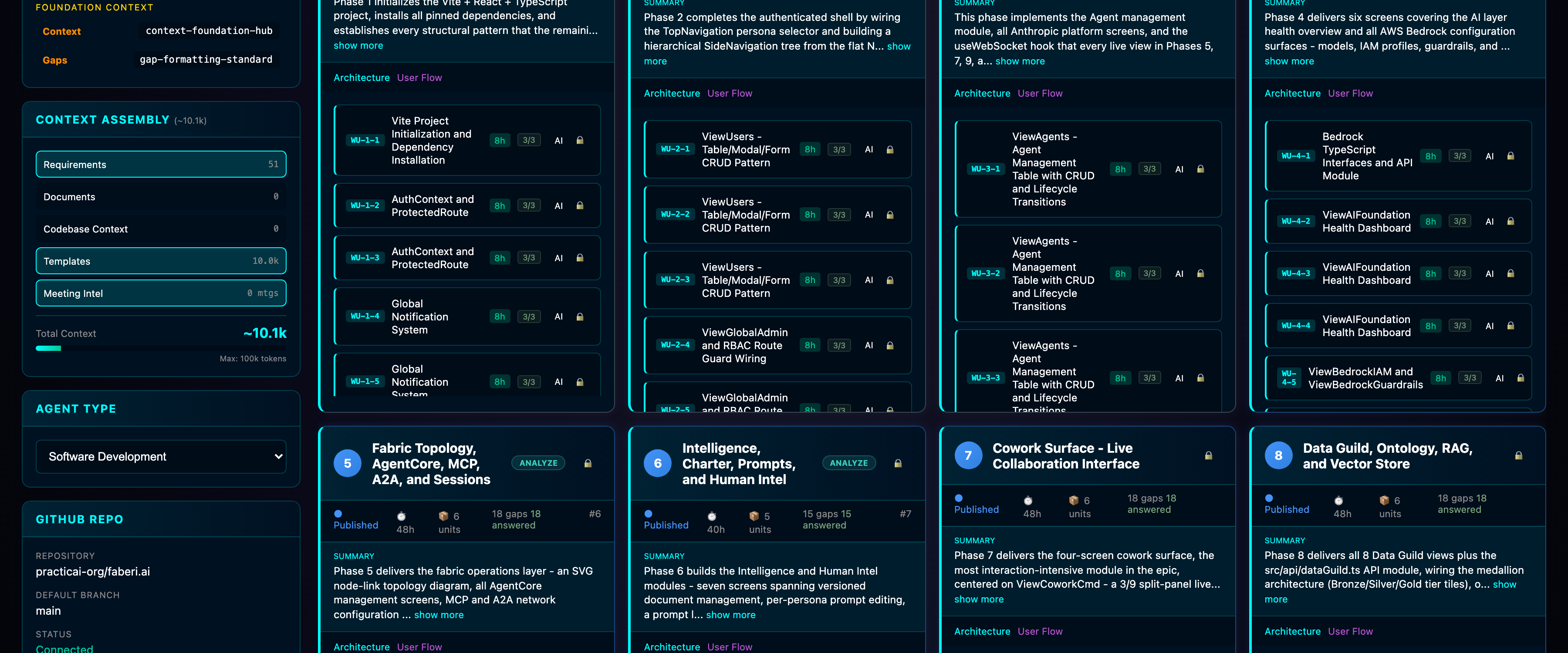
Open a phase and you get the units inside it. WU-1-1, WU-1-2, WU-1-3, each with an estimate, an acceptance count, and a lock once it has shipped.
Every phase header carries its own accounting:
Phase 5 · Fabric Topology, AgentCore, MCP, A2A, and Sessions
Published · 48h · 6 units · 18 gaps 18 answered · PR #6
That last line is the one that matters. Eighteen gaps, eighteen answered, and the pull request the phase shipped in. You can walk backwards from any line of merged code to the question that was asked before it was written.
On the left, the context that produced it: 51 requirements, the templates, the meeting intelligence, and a running total against the budget: ~10.1k of a 100k token ceiling. You can see what the model was given.
Gaps
A gap is a question the plan cannot answer on its own.
Most tools fill that silence with a guess, and a guess on the page is indistinguishable from a decision. StellarView lists them instead. Two hundred and ten on this epic, each attached to the work unit that raised it, each waiting on a person.
It does not leave you alone with them. Alongside every gap it suggests an answer drawn from your own material: the document you uploaded, the meetings it read, the code already in the repository. It also offers the moves that usually resolve one:
Change technology · Add testing phase · Split largest phase
Add documentation · What do meetings say?
You accept, edit, or ignore. The answer is recorded against the gap, and the work unit downstream updates.
A gap you have not answered will not silently become a decision somebody else made for you. That is the whole design.
The architecture
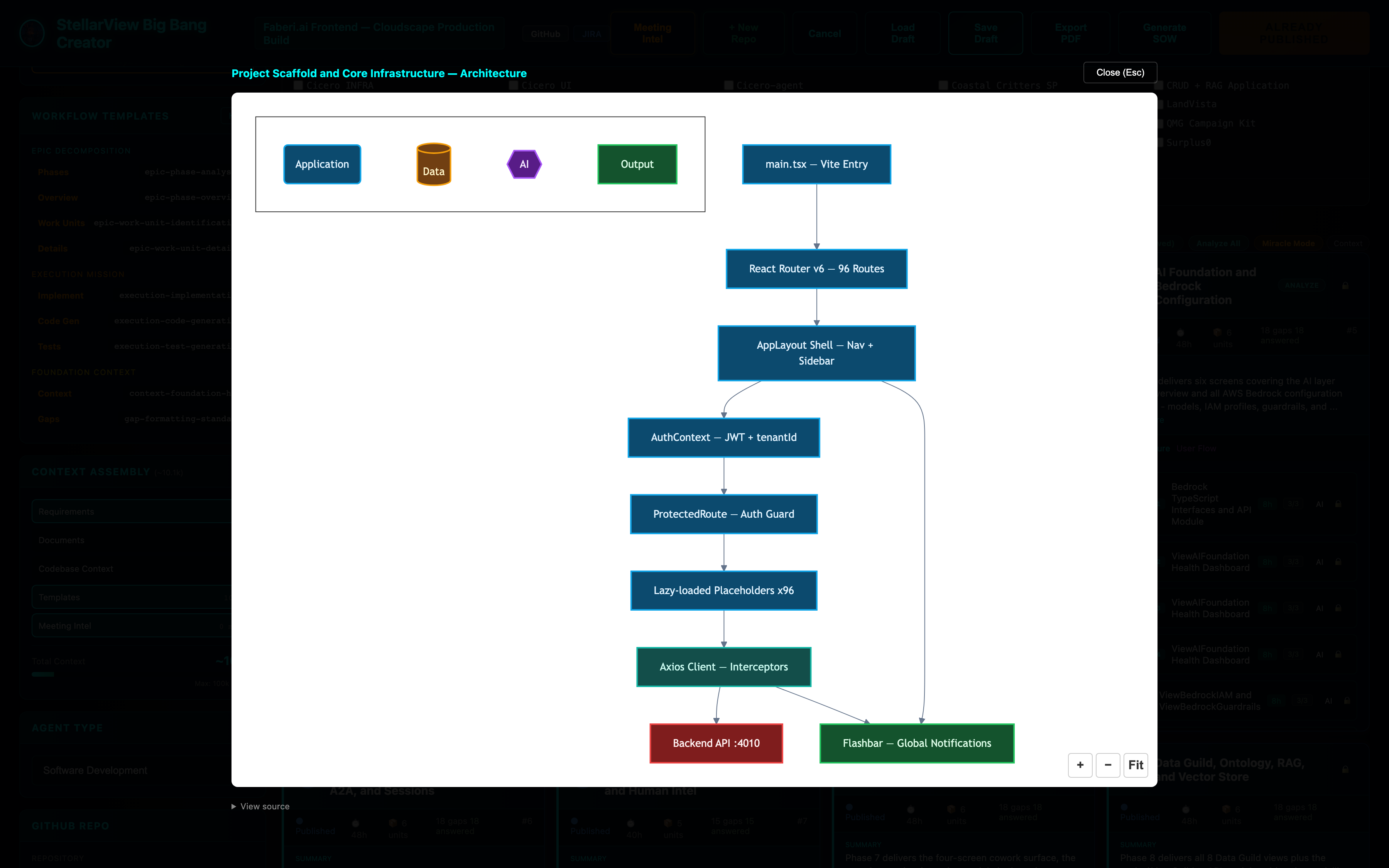
Every phase draws its own architecture, from the plan, before the code exists. Not a picture somebody made afterwards to explain what happened.
This one is Phase 1. The entry point, ninety-six routes, the layout shell, the auth context carrying a tenant, the guard, the lazily-loaded screens, the HTTP client, and the two things it talks to. Typed by role — application, data, AI, output — so the shape reads before the labels do.
Twelve phases, twelve diagrams. Each has a User Flow beside it.
How to do it
You need a galaxy loaded and a Claude key set. Then:
- Open Manage Epics and choose New Epic
- Choose From Document and give it the file you were actually sent — Word, PDF, markdown, a spreadsheet
- Wait for the extraction. Ours took twenty-five seconds on a thirteen-thousand character Word document
- Check what it pulled out, and fill Client Domain — it is required, and Generate Spec stays disabled until it has one
- Press Generate Spec
Specification, phases and work units are generated together, and it takes a few minutes. You can keep working; it will tell you when it is ready.
Worth knowing
It will refuse before it will guess. Generate Spec is disabled until the required fields are filled. That is deliberate: a plan built on a blank field is worse than no plan, because it looks finished.
Two or more repositories makes it a Constellation Epic. Tick the sibling repositories and the decomposition spans all of them. One child epic per repo, the contracts between them written down, and a build order that respects the dependencies. Leave it empty for the single-repository path.
The plan is an artifact, not a phase you pass through. Export it as a PDF, generate a statement of work from it, or push it to JIRA as epics and stories. The resource allocation on screen — delivery manager, solutions architect, engineer, with percentages and hours — comes from the same numbers.
The quality bar is shown, not hidden. This epic reads Requirements quality: PASS, 93%, with domain coverage at 151 of 170 and a list of what is still missing. When it is not confident, it says so on the same line.
Next: the plan is the input to execution. What comes out the other side — JIRA, the documents, the pull requests — is covered in the Unboxing, from 07:54.